Redesigning the Plivo Console and Building the Design Function
At a glance
- The problem
- Inconsistent navigation and components across the developer console made configuration difficult and required engineering teams to build the same patterns repeatedly.
- The decision
- Build a common foundation across five product areas, then introduce it in stages so existing customers could choose when to switch.
- My role
- Senior Product Designer Plivo, 2018 to 2020
- Worked with
- Product engineering teams, UI developers, product managers and founders, as Plivo’s first in-house designer.
My contribution
- Set a shared structure for the console and built a reusable design system across five product areas.
- Redesigned navigation, phone-number management, billing and account controls around customer tasks.
- Planned a phased rollout and established contribution guidelines and design reviews as the team grew.
Project outcomes
- Within three months, 70% of customers switched to the redesigned console and stayed with the new view.
- Reusable components and a shared review process gave engineers and incoming designers a common foundation for later product work.
Where the console was failing users
Plivo’s developer console served five distinct product areas (SMS, Voice, Phone Numbers, SIP Trunking, and Zentrunk). Because each was built by an isolated engineering pod, the console had five different design languages, navigation models, and UX patterns. There was no shared component library and no consistent behavior.
Support tickets revealed the extent of the friction, but the analytics showed a configuration problem: for actual product configuration, users preferred RYUK, an internal tool that exposed Plivo’s APIs in raw JSON format, over the customer-facing console. That preference helped identify where the console needed clearer configuration flows.
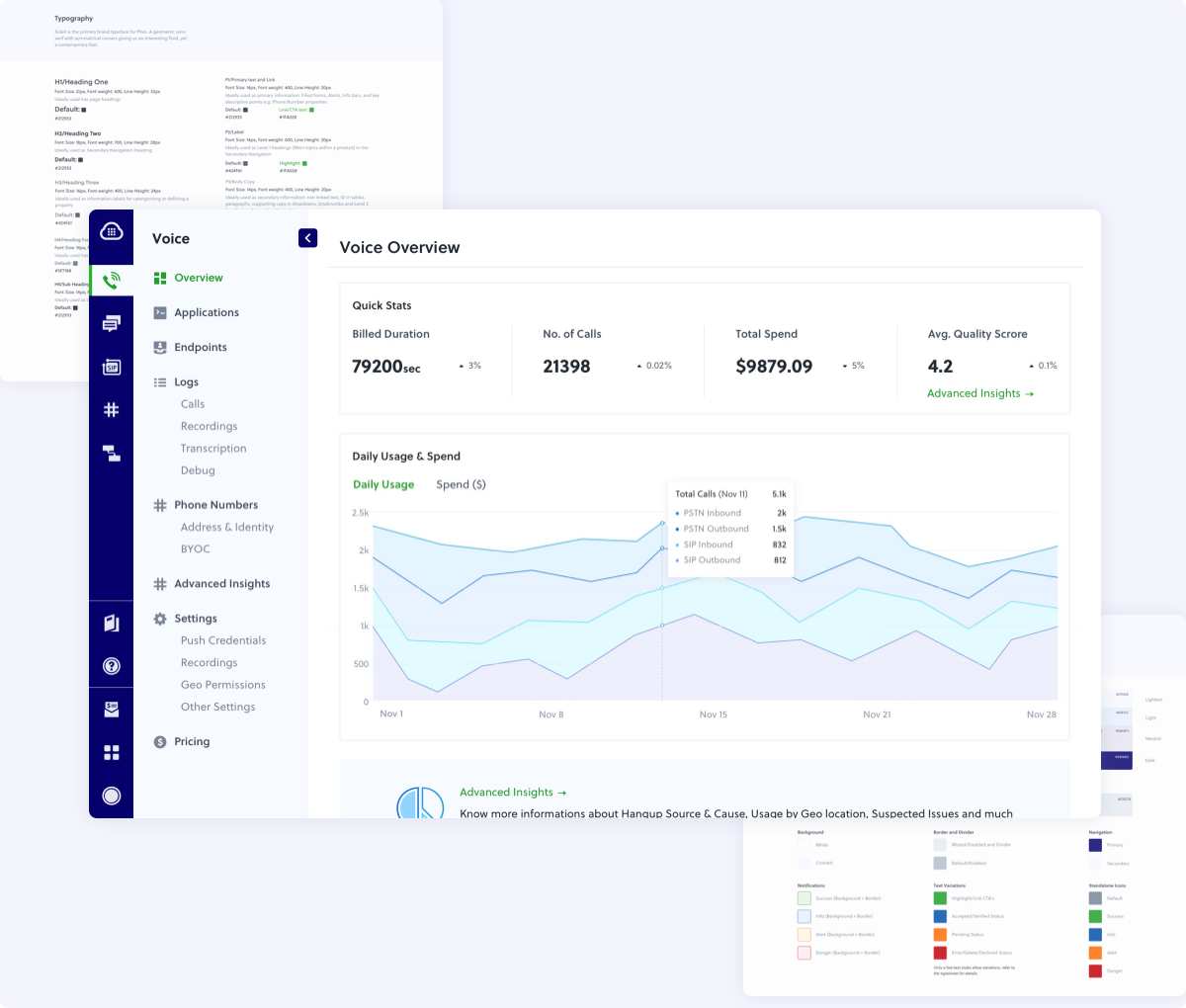 The fragmented console: five product areas, five design languages, zero shared patterns
 My Role
As Plivo’s first in-house designer, I led the console redesign across five product areas, working with product managers and UI developers. The decision was to establish one shared structure and design system that teams could extend, with a phased rollout for existing customers. This was also the starting point for building Plivo’s design function.
Choosing the problems to solve first
An audit across every product, supported by comparisons with Twilio, Nexmo and Messagebird, revealed two kinds of friction:
- Structural Debt (Navigation & Organization): Phone numbers were the shared resource across products, yet had no centralized management. Users could not buy or attach a number from within the product they were actively using. Furthermore, billing and account settings were entangled, making it difficult for enterprise customers trying to manage multiple sub-accounts and procurement teams.
- Design Debt: There were no standard patterns for forms, modals, filters, or tables. Because nothing was reusable, adding a simple feature required disproportionate engineering time.
The preference for RYUK gave me a concrete comparison: I could examine which configuration tasks were easier through direct API access and where the console added friction.
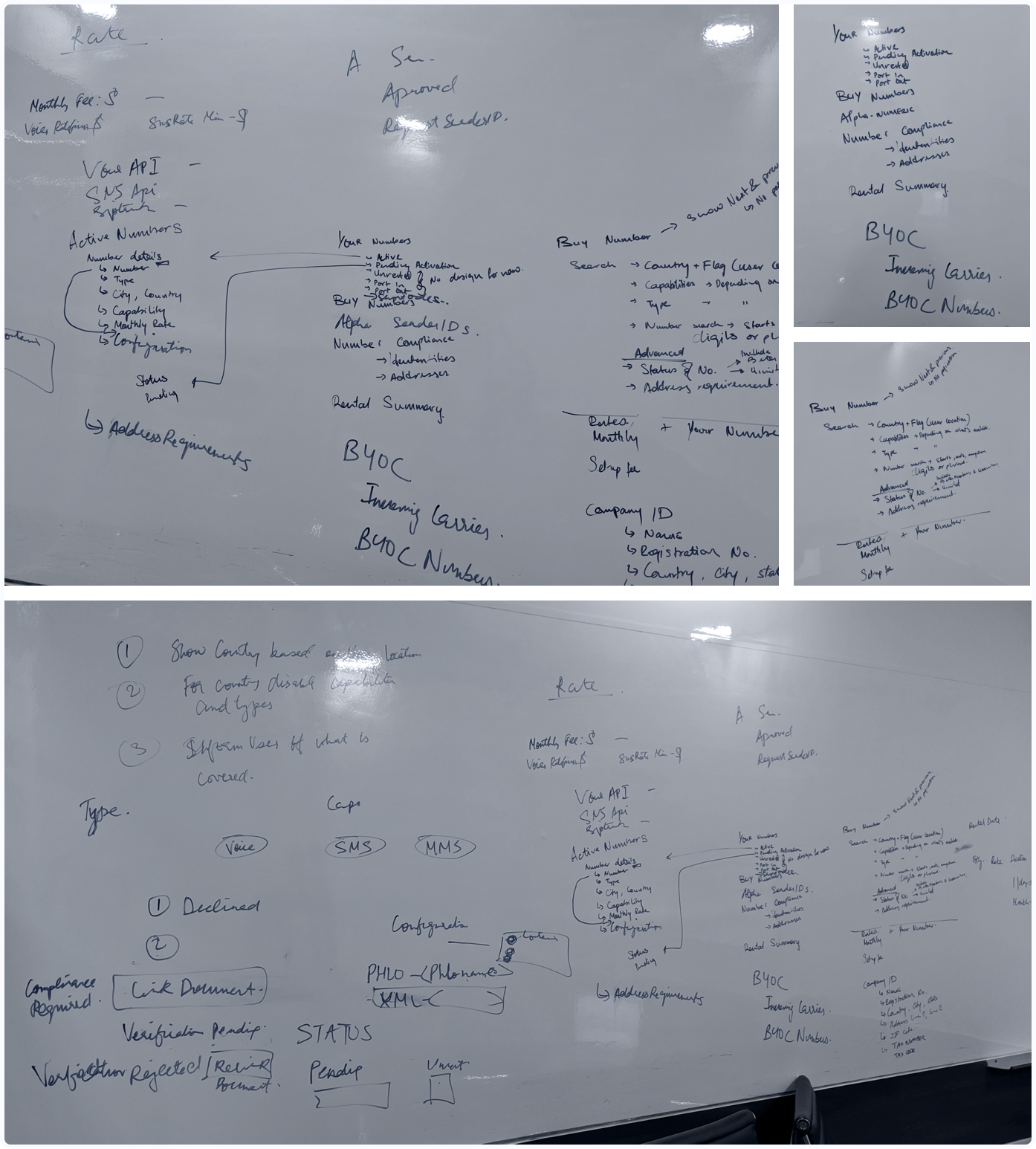 Audit working session. The decisions carried forward were shared navigation, separate finance and security settings, and central phone-number management.
 Building a shared foundation
I built a shared component library from the ground up: typography, color, spacing, forms, tables, navigation, modals, and filters. The components allowed teams to address different product needs through shared patterns, including a multi-level filter widget that expanded to hold dates, capabilities, and status in one action, eliminating the need for custom filtering logic in each product. All creation and editing flows were moved from disruptive modals into dedicated, stable page views.
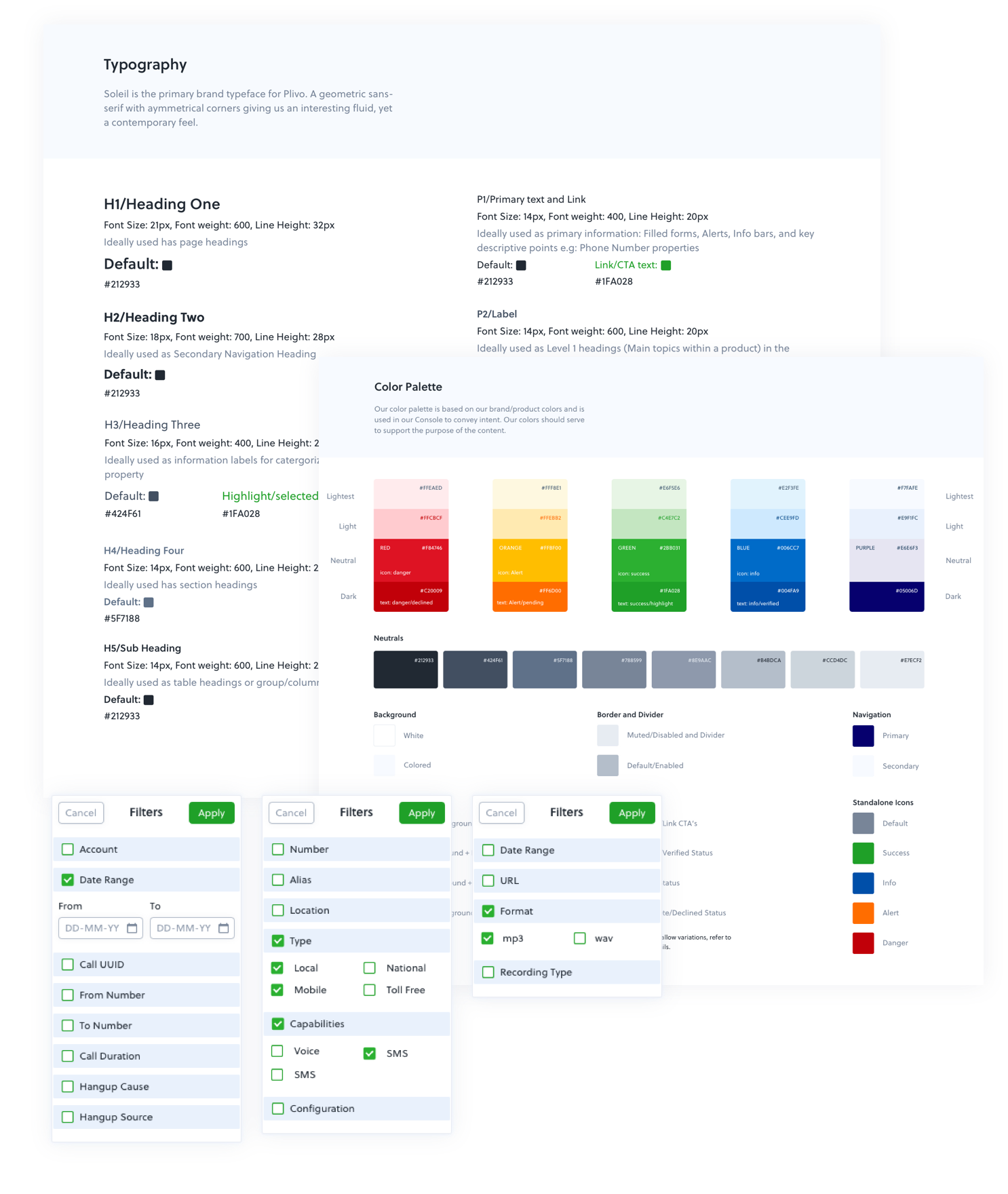 Shared component library: typography, color, spacing, forms, tables, navigation, and filters
 The decisions behind the redesign
The Navigation Pivot
I replaced the combined top-and-side navigation with a collapsible side panel. This left more room for data tables and gave customers a consistent way to switch between products.
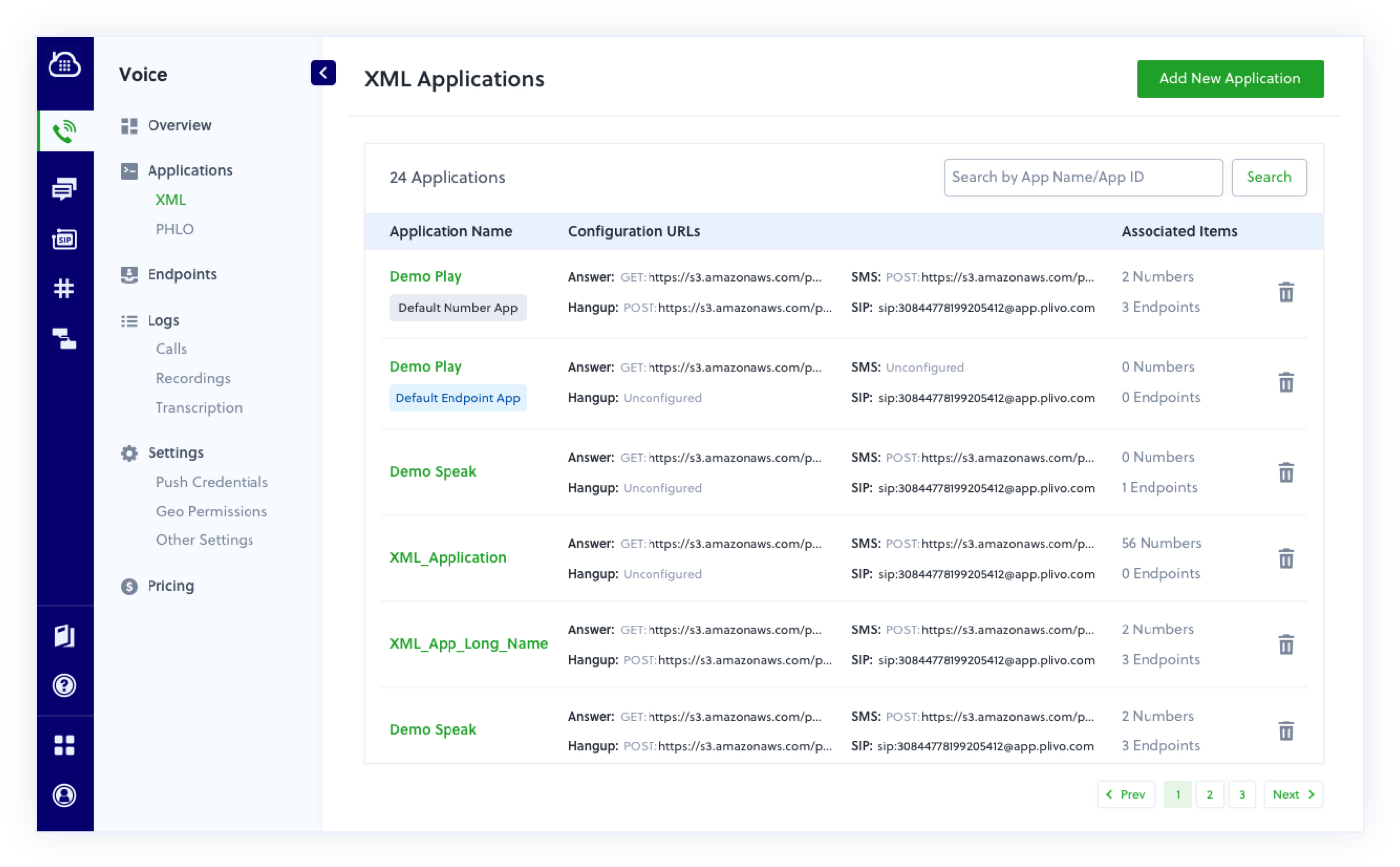 Collapsible side navigation replacing the combined top-and-side pattern
 Decoupling Finance and Security
Finance teams needed access to payments and invoices, while technical administrators needed to manage users, subaccounts and credentials. Separating these tasks into Finance and Account Security made the console reflect those different responsibilities, particularly for enterprise accounts with multiple billing entities.
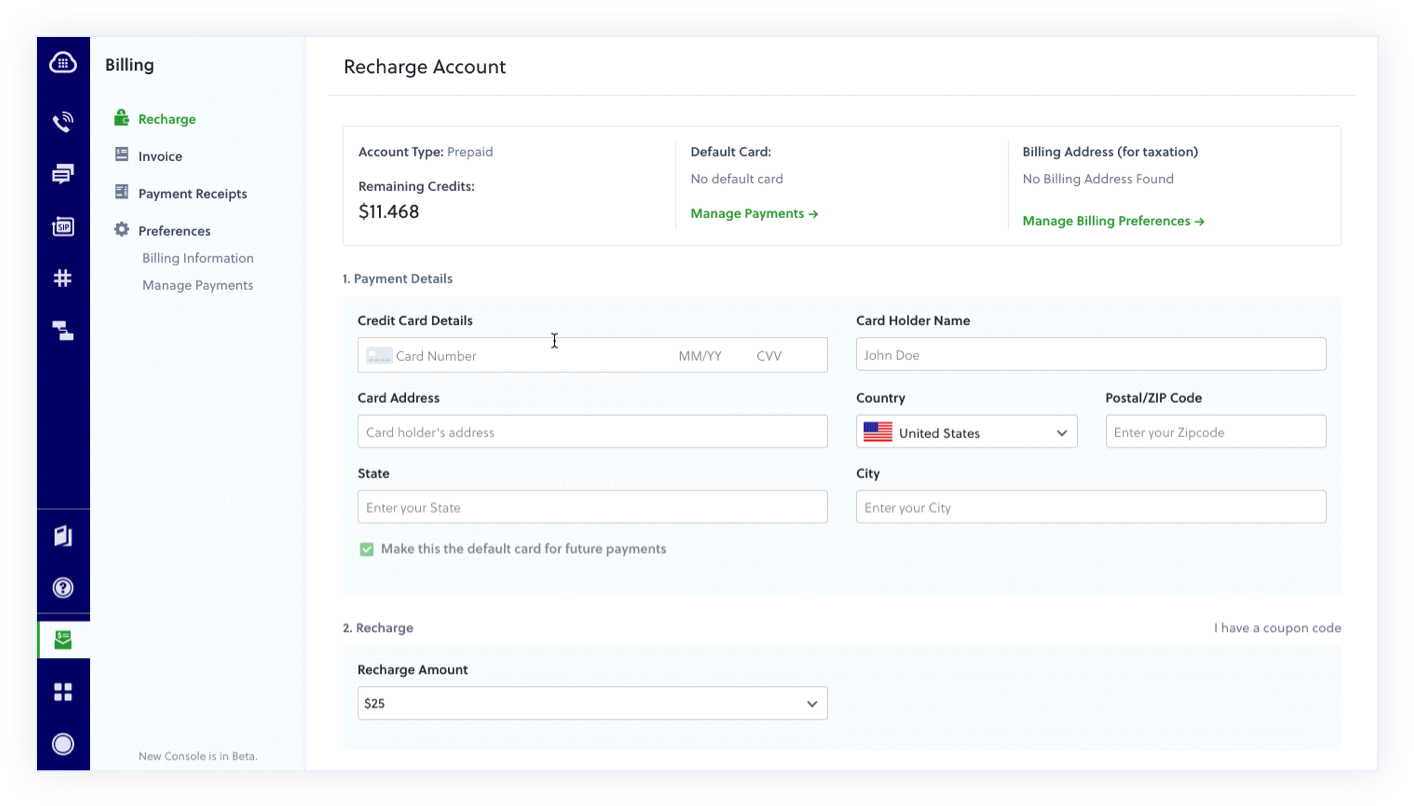 Finance and Account Security decoupled into separate pillars with role-based access
 Centralized Phone Numbers
I brought number management into one global panel, where customers could view, configure and attach numbers to applications without leaving their current product.
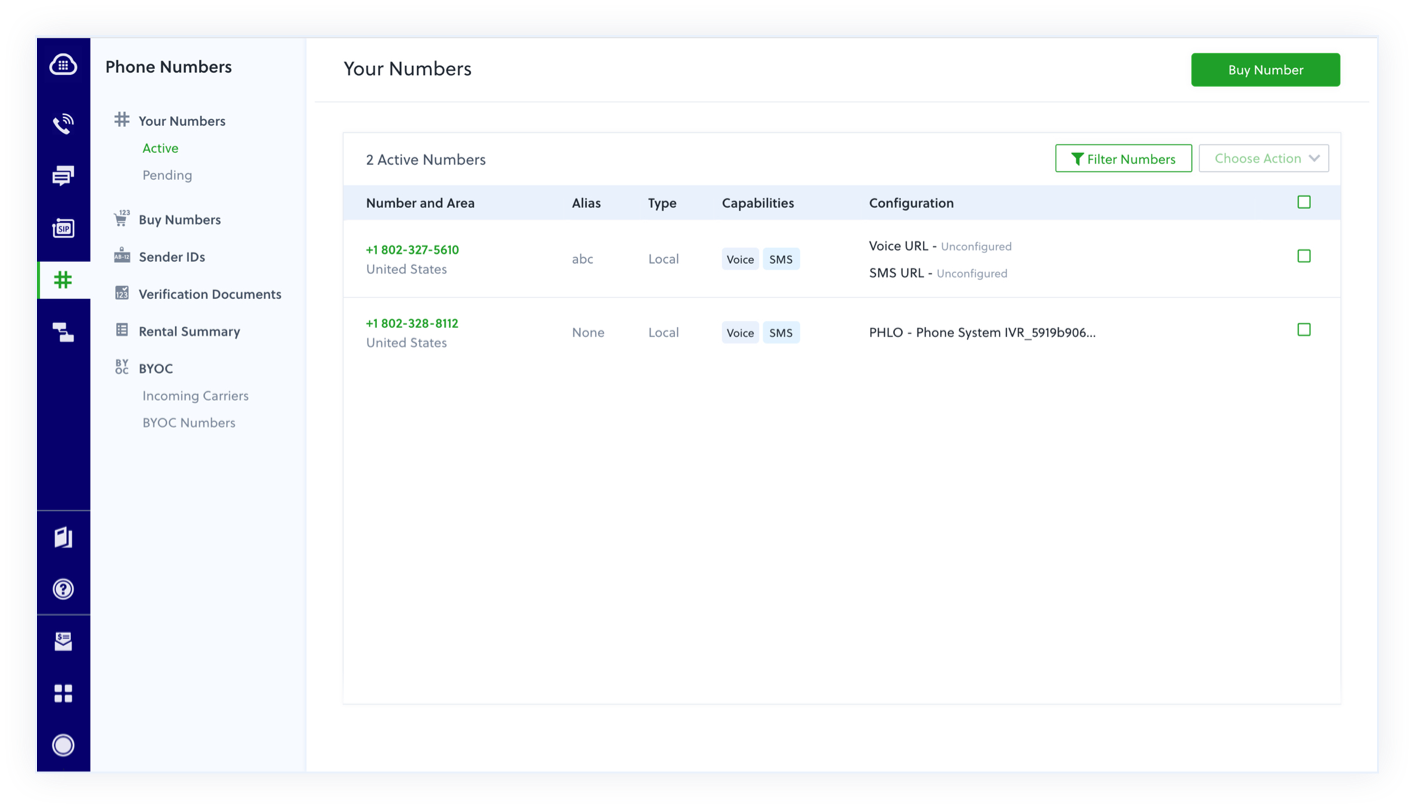 Centralized phone number management accessible from anywhere in the console
 Product-Specific Dashboards
I introduced landing pages with usage analytics for high-volume products (SMS and Voice), giving users visual data they previously could only find in raw logs.
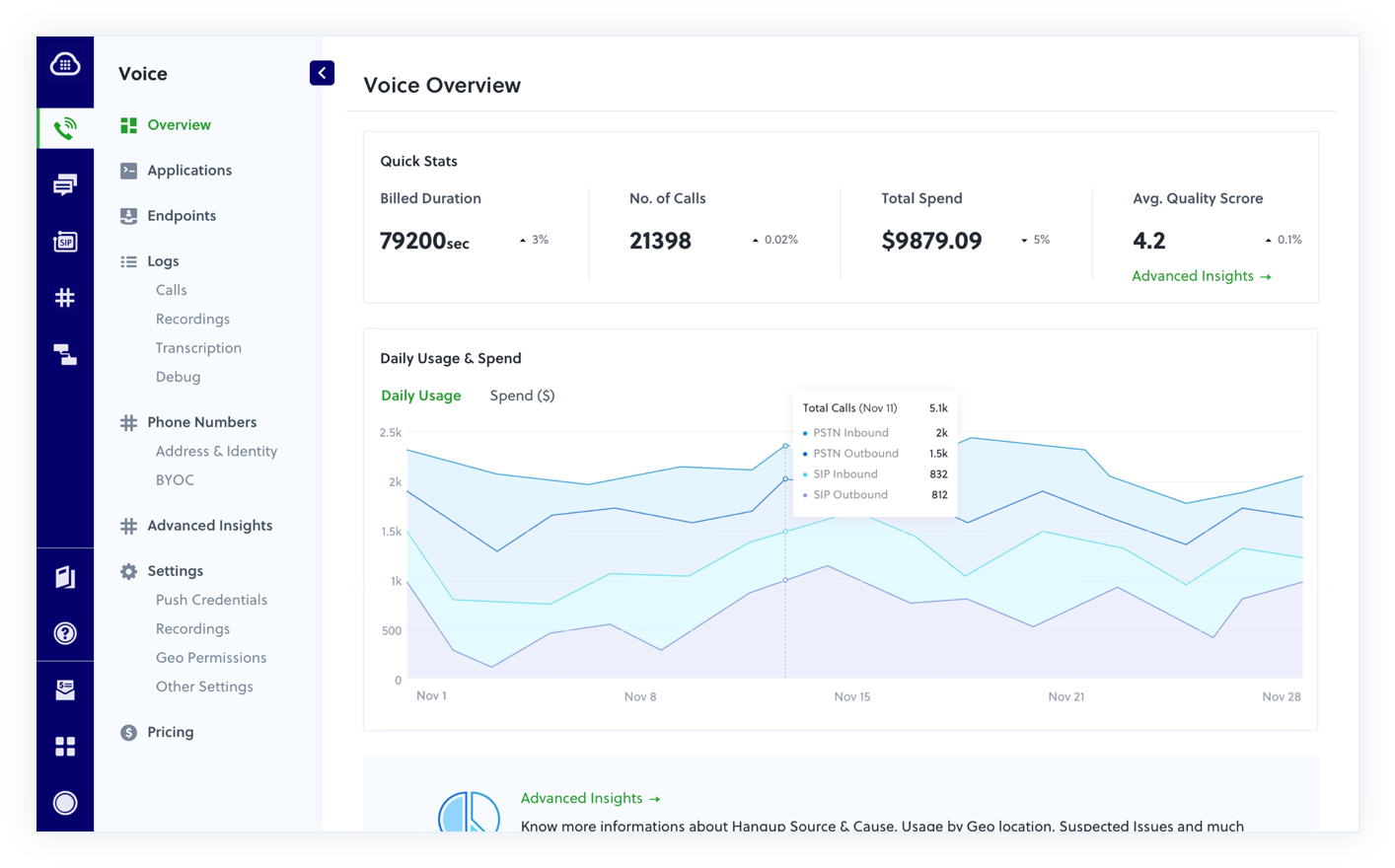 Product-specific dashboards with usage analytics for SMS and Voice
 A Phased Console Rollout
A redesign across five product areas could disrupt familiar workflows. I planned a phased rollout so existing customers could switch between the old and new views, while new accounts started on the redesigned console. New feature work went into the new experience. This gave customers a choice during the transition and gave the team one direction for future development.
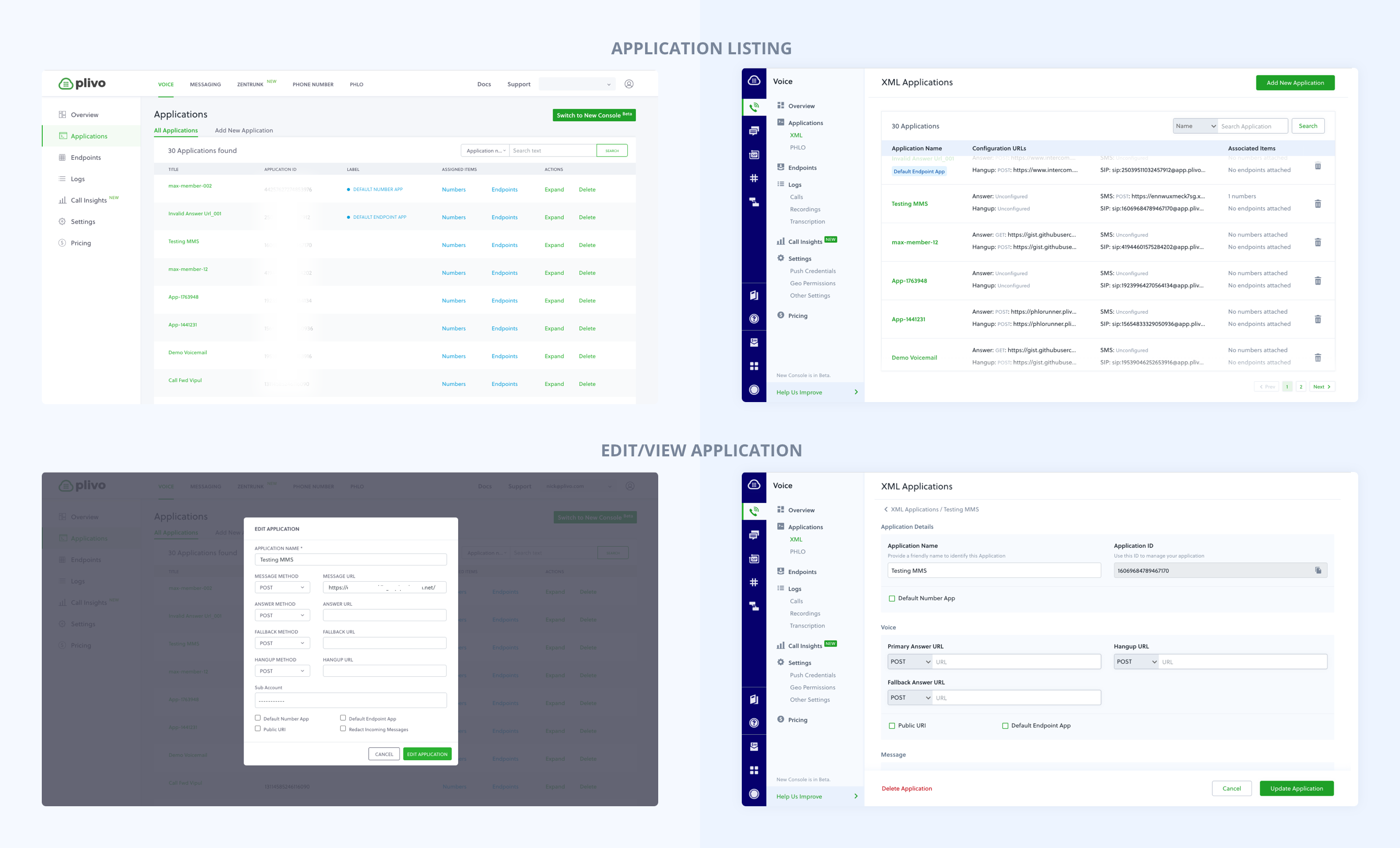 Before and after. The legacy interface on the left and the redesigned console on the right, showing the move to a single navigation model and shared components.
 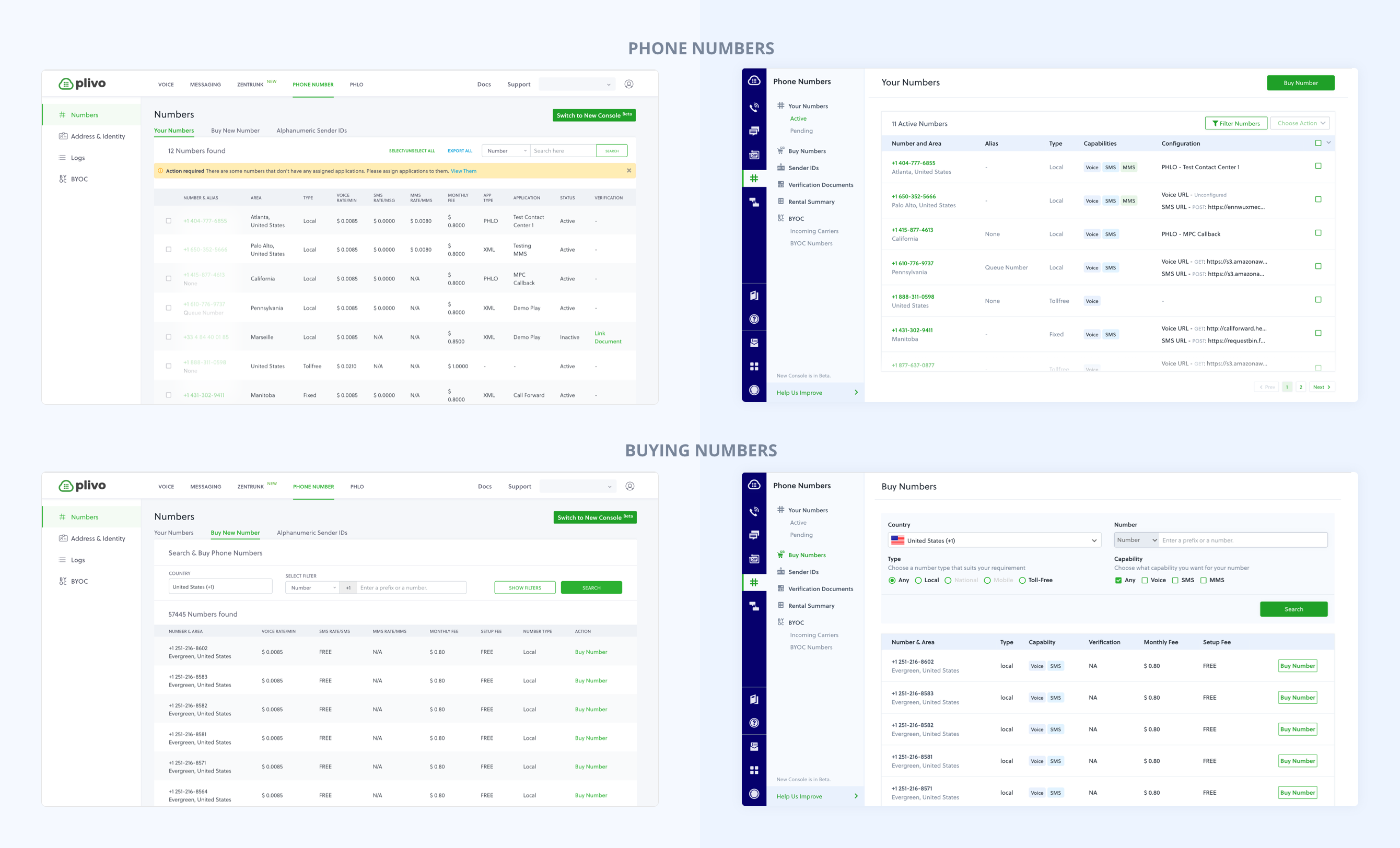 Migration from old to new console patterns across product areas
 Building the practice alongside the product
The contribution process was part of the design work. I was the only designer when I built the system, so I set up the process for adding to it as if a team were already here: shared Figma libraries with defined component APIs, documentation standards, and a review step before anything merged into the master library. Weekly design reviews became the quality-control and teaching mechanism. As I hired and grew the design function, new designers learned not just what the system contained but the reasoning behind each constraint, which kept one-off deviations from creeping in and kept the system coherent.
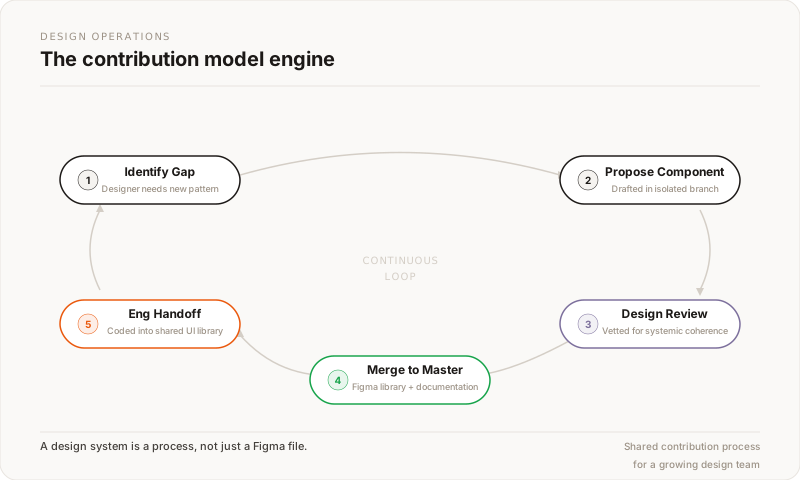 Design system contribution model: gap identification → proposal → review → master library → handoff
 The Outcome
Within three months, 70% of customers had switched to the new console view and stayed with it, rather than returning to the old interface. Existing customers retained the choice to switch during rollout.
- Rollout: Existing customers could switch between interfaces during the transition. New accounts started on the redesigned console.
- Shared implementation: Engineers could assemble shared components across features instead of building each pattern separately.
- Design foundation: The console library gave designers and engineers shared patterns and a process for extending them.
Reflection: Building for Handoff
The audit gave me a concrete starting point with engineering: a spreadsheet of inconsistencies and a plan for addressing them. It helped us agree on the work before discussing individual screens.
Documenting why we chose a pattern mattered as much as documenting the component. Other designers needed that reasoning to extend the system as I moved into broader platform work.
The later platform work called for a shared shadcn-based foundation. The contribution and review practices from the console work provided a starting point for that change.